When Your Phone Becomes a Time Sink, Something Has to Change
If you run an auto shop, you already know the drill. A technician is elbow-deep in an engine, the front desk is handling a walk-in, and the phone rings. Again. It's a customer asking whether their car is ready — the same customer who called yesterday and the day before. Meanwhile, someone who actually wants to book a new appointment gets sent to voicemail, and half of those people never call back. Congratulations, you've just lost revenue to a ringing phone.
This isn't a staffing problem. It's a systems problem. And one auto shop figured that out by leaning hard into automated text follow-ups — cutting their outbound call volume by a staggering 80% and giving their team back something priceless: time to actually do their jobs.
Here's how they did it, why it worked, and what you can steal from their playbook.
The Problem With Outbound Calls (And Why Most Shops Keep Making Them Anyway)
The Hidden Cost of "Just a Quick Call"
Nobody budgets for outbound calls. They seem free — you're already paying your service advisor's salary, and the phone is already on the desk. But every outbound call is a time tax. Research from various service industry studies suggests that the average business phone call lasts between 3 and 5 minutes. Multiply that by 30 to 50 status-update calls per day, and you're looking at 2 to 4 hours of productive labor evaporating into hold music and voicemails.
At an auto shop, that's two to four hours your service advisor isn't upselling a brake job, greeting a new customer, or helping a technician understand a customer's concern. The math is quietly brutal.
Why Customers Don't Actually Want to Be Called
Here's a truth that stings a little: most of your customers don't want a phone call. They want information, quickly, in the format that's most convenient for them — which, in 2024, is almost always a text message. According to industry data, open rates for SMS messages hover around 98%, compared to roughly 20% for email. People read texts. They often ignore calls from numbers they don't recognize, and they definitely don't enjoy sitting on hold.
The auto shop in our story — a mid-sized independent shop with four service bays and a team of six — had been calling customers to notify them of vehicle status updates, parts arrival, completed service, and appointment reminders. They were good at it. They were also exhausted by it.
The Breaking Point
The shop's service manager put it bluntly: "We were spending more time telling people their car was ready than actually fixing cars." That's the kind of operational irony that should keep business owners up at night. When they audited their outbound call log, they found that roughly 70% of their calls fell into just three categories: appointment reminders, vehicle-ready notifications, and follow-ups on declined services. All three were ripe for automation.
Building the Automated Text Follow-Up System
Mapping the Right Moments for Automation
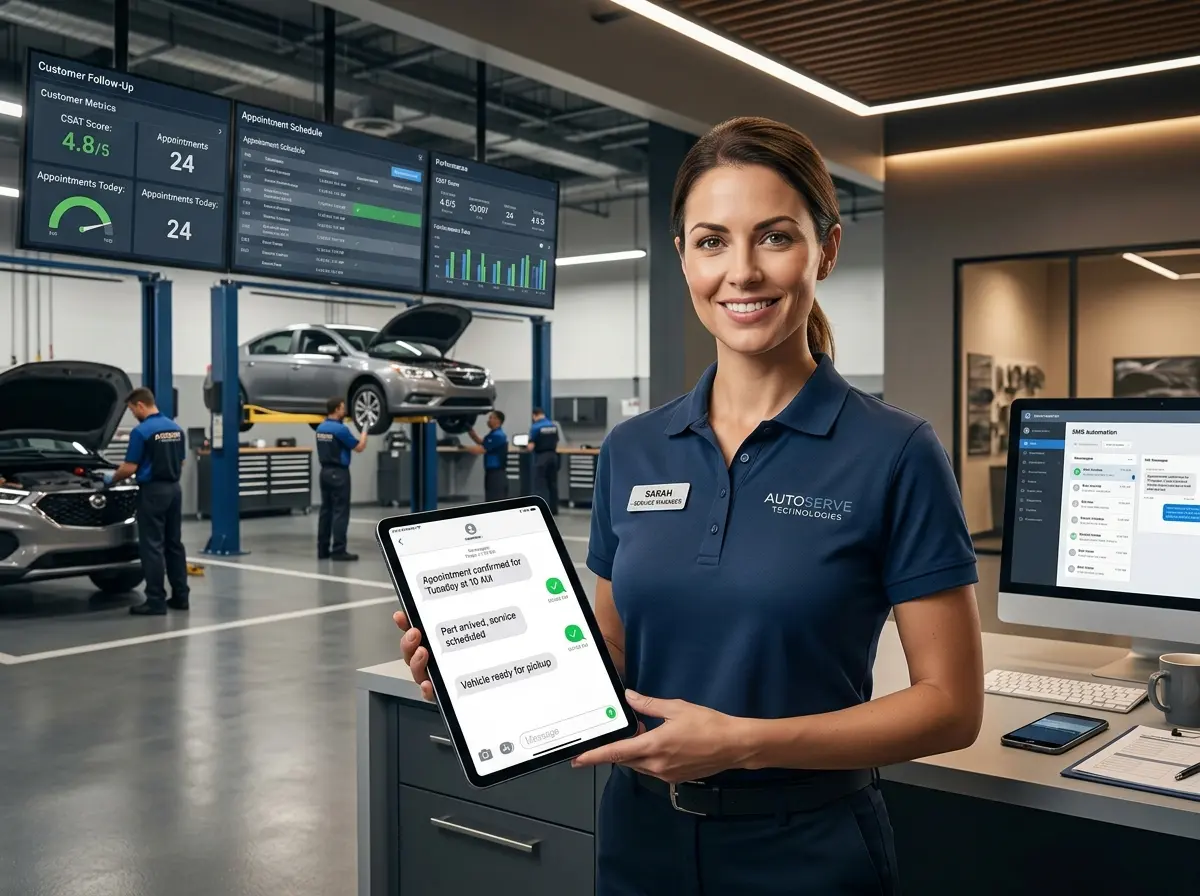
The shop didn't try to automate everything at once — a wise move. Instead, they identified the specific touchpoints where a text message could fully replace a phone call without sacrificing the customer relationship. Those touchpoints were: appointment confirmation and reminder (24 hours out and 2 hours out), vehicle check-in confirmation, technician inspection complete with a link to approve or decline services, vehicle ready for pickup notification, and a post-service follow-up asking for a review or flagging any concerns.
Each of these moments is transactional in nature. The customer doesn't need a conversation — they need information and, sometimes, a simple yes or no decision. Text handles all of that better than a phone call.
The Messaging That Actually Gets Responses
The shop learned quickly that the wording of automated texts matters enormously. Generic, robotic messages got ignored. Conversational, specific messages got responses. They moved away from messages like "Your vehicle is ready for pickup." and toward messages like "Hi Sarah! Your 2019 Honda CR-V is all set and ready to roll. We replaced the brake pads and topped off your fluids — everything's looking great. Come grab it anytime before 6 PM. Reply CONFIRM if you're on your way!"
That personal touch — including the customer's name, the specific vehicle, and the work performed — made customers feel like the message came from a human who knew them. Response rates jumped significantly, and the shop started collecting more review submissions simply because the post-service follow-up text made it frictionless.
How Technology Like Stella Fits Into This Picture
Automating text follow-ups is a significant win, but it only addresses outbound communication. What about inbound calls from customers who still want to talk? That's where a tool like Stella — an AI robot employee and phone receptionist — becomes genuinely useful for an auto shop.
Stella answers phone calls 24/7, handles common questions about services, hours, and pricing, and can collect customer intake information through conversational intake forms during phone calls — feeding everything directly into a built-in CRM that stores customer profiles, notes, tags, and service history context. That means when a customer does call in, Stella handles it professionally without pulling a service advisor off the floor. For shops with a physical location, she also operates as an in-store kiosk, greeting customers who walk in and answering their questions while staff are busy. Between automated texts going out and Stella handling incoming calls, the phone stops being a bottleneck and starts being a non-issue.
The Results — And What You Can Realistically Expect
What the Numbers Looked Like After 90 Days
After implementing automated text follow-ups across all five key touchpoints, the shop tracked their results over a 90-day period. Outbound calls dropped from an average of 42 per day to fewer than 9. Those remaining calls were exclusively for complex situations — customers who hadn't responded to texts, unusual repair authorizations that required explanation, or customer-initiated callbacks. In other words, the calls that actually benefited from a human conversation.
Staff satisfaction improved visibly. The service advisor reported feeling less frazzled and more able to focus on high-value interactions with walk-in customers and complex service consultations. Google review submissions increased by about 35% because the post-service text made leaving a review a one-tap experience. And appointment no-shows dropped by nearly half, thanks to the two-stage reminder system.
The Customer Reaction
Somewhat counter-intuitively, customer satisfaction scores went up — not down. It turns out customers appreciate being informed without being interrupted. They liked being able to approve a service recommendation by replying "YES" to a text while sitting in a meeting, rather than having to step out to take a call. Several customers specifically mentioned the text communication in positive reviews, calling it "convenient" and "professional."
Pitfalls to Avoid When Rolling This Out
A few important lessons from the shop's implementation are worth keeping in mind. First, always give customers an easy way to opt out of texts and request a phone call instead — both for legal compliance and for the subset of customers who genuinely prefer voice. Second, don't automate everything. Some conversations need a human, and trying to push a $2,000 repair approval through an automated text is a great way to lose the job. Third, monitor your response rates regularly. If texts are going unread, the message content or timing needs adjustment. Automation is not a "set it and forget it" forever proposition — it needs occasional tuning.
A Quick Reminder About Stella
Stella is an AI robot employee and phone receptionist designed for businesses like yours — available as an in-store kiosk that greets and engages customers in person, and as a 24/7 AI phone receptionist that handles calls, collects information, and keeps your staff focused on the work that actually pays. At $99/month with no upfront hardware costs, she's built to make your operation run smoother without adding headcount. Think of her as the employee who's always on time, never has a bad day, and doesn't need a coffee break.
Your Action Plan: Start Cutting Calls This Month
The auto shop in this story didn't overhaul their entire business overnight. They picked the highest-volume, lowest-complexity outbound calls and automated those first. Within weeks, they felt the difference. Within 90 days, they had the data to prove it.
Here's a straightforward path forward for any shop owner ready to make the same shift:
- Audit your outbound calls for one week. Categorize every call by type and ask yourself honestly: could this have been a text?
- Choose two or three touchpoints to automate first. Appointment reminders and vehicle-ready notifications are almost always the right starting point.
- Write conversational, specific messages — not corporate-sounding notifications. Use the customer's name, their vehicle, and relevant details.
- Set up an easy opt-out path and designate which situations always get a human call regardless of automation.
- Track your results over 60 to 90 days and refine based on open rates, response rates, and staff feedback.
The phone is a tool, not a tether. When you use it strategically — reserving it for the conversations that genuinely need a human touch and letting automation handle the rest — your team gets their time back, your customers get faster and more convenient updates, and your shop runs the way it was meant to: efficiently, professionally, and with a lot fewer interruptions.
Your technicians didn't get into the business to play phone tag. Give them — and yourself — a better system.